File Converter
Batch file conversion on your computer, with clear progress and a way to recover when a file fails.
Application development · interface and conversion workflow
Try a conversion
Convert your own PNG or JPEG images locally, or use a sample batch.
The problem
Converting a folder of files should not mean uploading them to a website or repeating the same steps for every file. It also needs to be clear which outputs were saved when part of a batch fails.
How it works
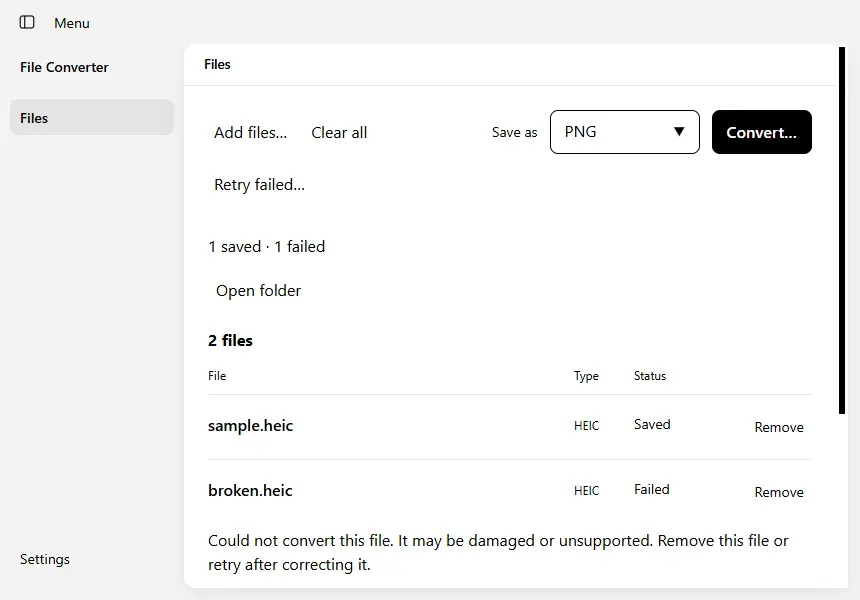
The desktop interface lets you choose files, select a compatible output format and start a batch. Conversion engines run behind a controlled application interface. Each file keeps its own progress and result, so a damaged input does not hide successful conversions.
Engineering decisions
I put recovery in the main workflow: failed files can be retried, a running batch can be stopped, and unsupported combinations are explained before conversion. The application coordinates specialist engines rather than reimplementing every file format.
What I verified
The original app was exercised with HEIC images, a deliberately damaged file and document-to-PDF conversion. The run also checked cancellation, settings persistence and accessibility in several display modes.
Current limits
These captures show a local development build. Conversion fidelity depends on the format and engine; this is not a claim that every format is lossless or that an installer has been verified.
Collaboration & credits
Built on Electron and React, with conversion tools including ImageMagick, LibreOffice, Pandoc and ExifTool. My work is the application, integration and user workflow.